
Number Masking
Connect two parties over a voice call without exposing their real phone numbers.
The Number Masking service enables two parties to engage in a conversation over the phone without exposing their phone numbers to each other. This service is ideal for businesses that share customer information with third parties.
Prerequisites
In order to use the Number Masking service the first step is to purchase a number (DID number) which will serve as the connection bridge between two parties. Number masking action needs be set up and then you will be ready to advertise this number to your customers.
Use our Numbers API or Customer portal to purchase a Voice enabled phone number.
Number masking workflow
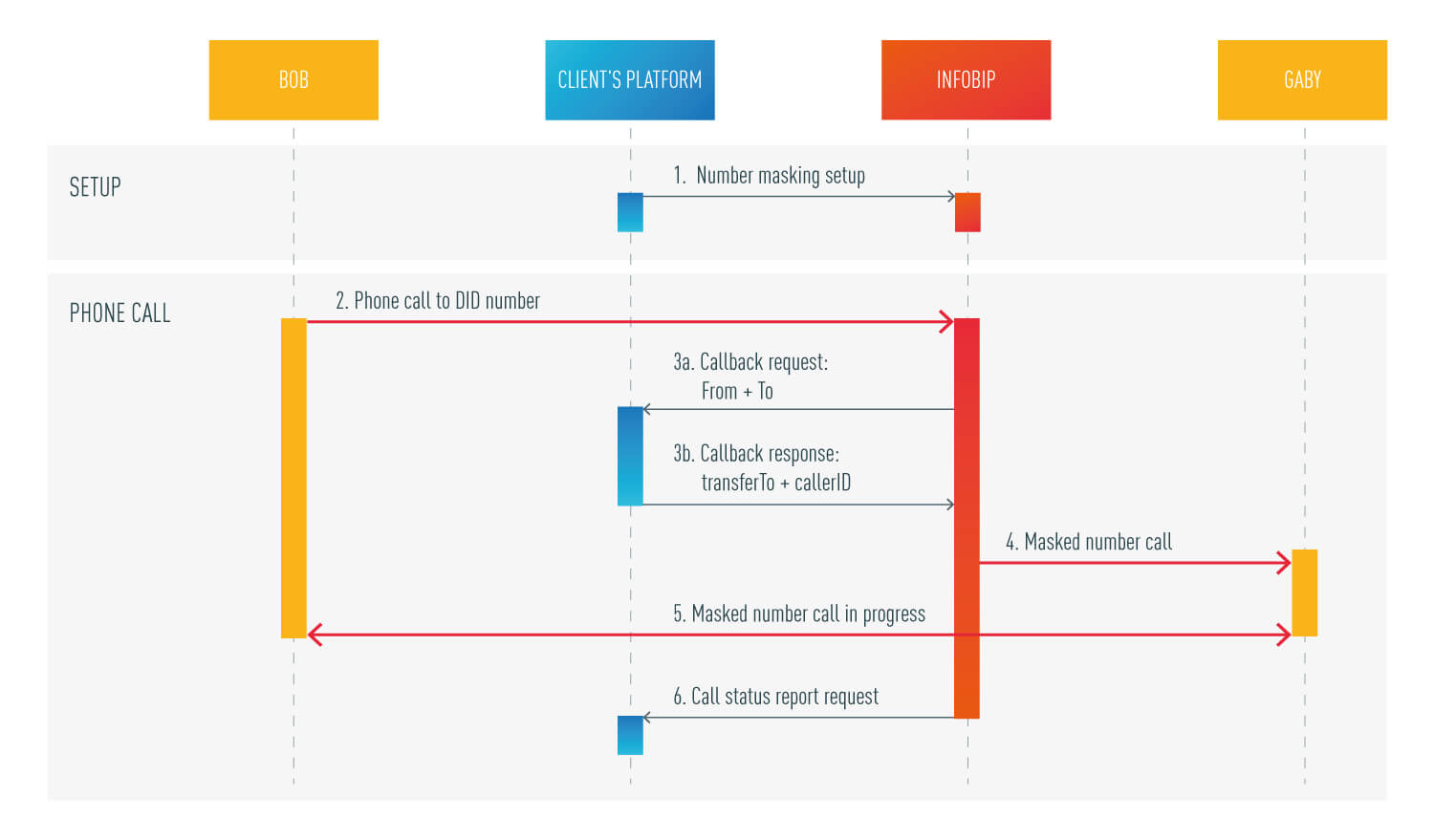
Number masking setup:
Additional methods:
Number masking action setup
This method allows you to setup CallBack and Status URLs for DID number.
- CallBack URL is needed in order to get instructions from your side of how to handle incoming calls on a DID number.
Instructions are result of mapping logic implemented on your side according to your business case.
- Status URL will be used to deliver status report after the call is finished.
POST https://api.infobip.com/numbers/1/numbers/{numberKey}/actions
Request parameters
| Property name | Type | Description |
|---|---|---|
| type | string | Type of number setup (VOICE_NUMBER_MASKING). |
| callbackUrl | string | Client’s URL to call on each number inbound call. |
| statusUrl | string | Client’sURL for status report delivery. |
Request example
POST /numbers/1/numbers/6FED0BC540BFADD9B05ED7D89AAC22FA/action HTTP/1.1
Host: api.infobip.com
Authorization: Basic QWxhZGRpbjpvcGVuIHNlc2FtZQ==
Content-Type: application/json
Accept: application/json

{
 "type" : "VOICE_NUMBER_MASKING",
 "callbackUrl" : "http://client.server/1/callback",
 "statusUrl" : "http://client.server/1/status"
}
Response
{
  "actionKey": "6FED0BC540BFADD9BD89AAC22FA",
  "type": "VOICE_NUMBER_MASKING",
  "callbackUrl": "http://client.server/1/callback",
  "statusUrl": "http://client.server/1/status"
}
A successful response is represented by a 200 OK HTTP status code.
Audio file upload
In some situations you may want to play an audio message to the caller instead of forwarding the call to a number from your mapping logic. The audio file should be prerecorded and uploaded to our servers in advance. Audio fileId will be returned in the response of the upload request and this fileId might be received as a response to the callback URL request (described in the following steps).
POST https://api.infobip.com/numbers/1/files
Request parameters
| Property name | Type | Description |
|---|---|---|
| url | string | URL of the voice file location. Max size of the file is 4MB. Acceptable file format is mp3. |
| content | string | Byte array of the voice file can be included instead of file URL. |
Request example:
POST /numbers/1/files HTTP/1.1
Host: api.infobip.com
Authorization: Basic QWxhZGRpbjpvcGVuIHNlc2FtZQ==
Content-Type: application/json
Accept: application/json

{
	"url": "http://www.winhistory.de/more/winstart/mp3/winxp.mp3"
}
Instead of the file URL, the request can contain a byte array of the audio file. In that case, the body of the request should look like this:
{
   "content": "SUQzBAAAAAAAF1RTU0U................oBlRZUxIALUaldwrWAAIoVfL"
}
Response:
{
  "fileId": "382a92df-1f6d-4d30-8274-cf508a0c7d62"
}
Response parameters
| Property name | Type | Description |
|---|---|---|
| fileId | string | Id of the uploaded audio file. Id might be used as a Callback response (see next step). |
CallBack URL Request
Upon receiving a call to the DID number from your customer, Infobip’s platform will generate a request to callbackUrl configured on the number. The request contains the caller number and the DID number. In return, Infobip’s platform expects the phone number to forward the call to and caller id which should be presented.
Request parameters
| Property name | Type | Description |
|---|---|---|
| from | string | Caller number |
| to | string | Called number |
| correlationId | string | Unique identifier of the call record, available for both Callback and Status requests. |
Request example
{
	"from": "41793026727",
	"to": "41793026731",
    "correlationId": "0f754338-1aff-4e09-a933-7d205ca7aed4"
}
Response
{
	"command": "dial",
	"phoneNumber": "41793026785",
	"callerId": "41793026700"
}
Depending of the use case, the response may contain the audio file id which will be played back to the caller. In that case, the response should look like this:
{
    "command": "audio",
    "fileId": "382a92df-1f6d-4d30-8274-cf508a0c7d62"
}
Response parameters
| Property name | Type | Description |
|---|---|---|
| command | string | Command description. Values should be dial or audio. |
| phoneNumber | string | Destination phone number to call. |
| callerId | String | Which callerId should be displayed to called party. |
| fileId | String | File to be played to your customer. |
Status URL Request
When a call is terminated, Infobip’s platform will send a status report to the statusUrl that was provided during the setup of the number.
Request parameters
| Property name | Type | Description |
|---|---|---|
| action | string | configured action (dial or audio). |
| from | string | Caller number. |
| to | string | DID number. |
| transferTo | String | Called party (transfer) number. |
| duration | int | Duration of the call. |
| status | String | Status of the call. Could be answered, busy, no answer, failed or congestion. |
| FileID | String | File that was played to your customer. |
| ringingTime | String | Date and time when ringing has started. |
| answeredTime | String | Date and time when call was answered. |
| correlationId | string | Unique identifier of the call record, available for both Callback and Status requests. |
Request example:
{
  "action": "dial",
  "from": "41793026727",
  "to": "41793026731",
  "transferTo": "41793026785",
  "duration": "235",
  "status": "answered",
  "ringingTime": "2018-01-01 12:00:00",
  "answeredTime": "2018-01-01 12:00:10",
  "correlationId": "0f754338-1aff-4e09-a933-7d205ca7aed4"
}
A successful response is represented by an HTTP status code 200 OK from the Client’s platform.
Additional APIs
Get number masking action
The method will return a masking action setup on a specific number (numberKey).
GET https://api.infobip.com/numbers/1/numbers/{numberKey}/actions
Request example
GET /numbers/1/numbers/6FED0BC540BFADD9B05ED7D89AAC22FA/actions HTTP/1.1
Host: api.infobip.com
Authorization: Basic QWxhZGRpbjpvcGVuIHNlc2FtZQ==
Accept: application/json
Response
{
  "actions": [
    {
      "actionKey": "6FED0BC540BFADD9BD89AAC22FA",
      "type": "VOICE_NUMBER_MASKING",
      "callbackUrl": "http://client.server/1/callback",
      "statusUrl": "http://client.server/1/status"
    }
  ]
}
Delete a number masking action
This method will delete a single number masking action (actionKey) on a number (numberKey).
DELETE https://api.infobip.com/numbers/1/numbers/{numberKey}/actions/{actionKey}
Request example
DELETE /numbers/1/numbers/6FED0BC540BFADD9B05ED7D89AAC22FA/actions/6FED0BC540BFADD9BD89AAC22FA HTTP/1.1
Host: api.infobip.com
Authorization: Basic QWxhZGRpbjpvcGVuIHNlc2FtZQ==
Accept: application/json
A successful response is represented by an HTTP status code 204 No Content. There is no response body.