
SMTP SPECIFICATION
Infobip SMTP API behaves in the same way as any SMTP compliant server (for example your ISP, Gmail, or your corporate email server). This means that you can configure any mail client such as Outlook or Thunderbird to use Infobip SMTP as a relay. There is however a restriction in sender which can be used for relying upon the messages, and of course, you should be authenticated with Infobip supplied credentials.
Following settings should be used to configure the client:
Parameters
| Settings | Value |
|---|---|
| Server Name |
smtp-api.infobip.com |
| Port | 587 |
| User Name / Password |
See the "Authentication" section. |
| Authentication method | Normal password |
| Connection Security | STARTTLS |
Note:
- Currently we do not support ports 25 and 465.
- At the moment we don't support "cc" and "bcc" functionality
Authentication
Supported SMTP authentication mechanisms are PLAIN and LOGIN. Both require username and password.
For basic authentication use Infobip's account username and password.
For authentication with Infobip API key (https://dev.infobip.com/getting-started/security-and-authorization), use username: "App" and then enter the API key as password (same as for authentication over HTTP). ###
Optional headers
Infobip specific information can be included in the email through custom headers.
Currently, supported headers are:
Parameters
| Property name | Header name | Descriptionbul |
|---|---|---|
| bulkId | X-IB-bulk-id | The ID uniquely identifies the sent Email request |
| trackingUrl | X-IB-tracking-url | The URL on your callback server on which the open and click notifications will be sent. |
| intermediateReport | X-IB-intermediate-report | Set to `true` for receiving the real-time Intermediate delivery report on your callback server. |
| notifyUrl | X-IB-notify-url | The URL on your callback server on which the Delivery report will be sent. |
| notifyContentType | X-IB-notify-content-type | Preferred Delivery report content type. Can be `application/json` or `application/xml`. |
| callbackData | X-IB-callback-data | Additional client's data that will be sent on the `notifyUrl` |
Supported SMTP commands
Infobip SMTP server supports the following commands:
- HELP
- HELO
- EHLO
- AUTH
- MAIL FROM
- RCPT TO
- DATA
- RSET
- QUIT
- NOOP
- STARTTLS
Testing With an email client
To test sending emails over Infobip's SMTP API you can use one of the standard email clients, for example, you can use Thunderbird Mail client.
Steps to configure Thunderbird Mail:
- After installing Thunderbird on your laptop, configure one of your existing (incoming) email addresses. This step is required because Thunderbird is not willing to send an email without configuring some client email address.
- Right-click wanted account → Settings → Outgoing Server
- Click on Add button
- Set following properties (see also picture below)
Parameters
| Settings | Value |
|---|---|
| Server Name | smtp-api.infobip.com |
| Port | 587 |
| User Name | username |
| Authentication method | Normal Password |
| Connection Security | STARTTLS |
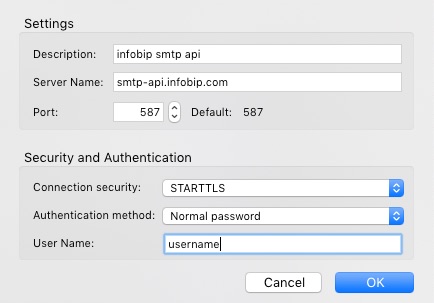
Change username with actual account authentication data.
Make sure you set this server as default.
After that, you can start composing the email. Since senders are restricted on Infobip platform, you must use one of your Infobip verified domains (or registered senders) for "from" address. In Thunderbird, this may be achieved by clicking on "Customize From Address" in "From" field.
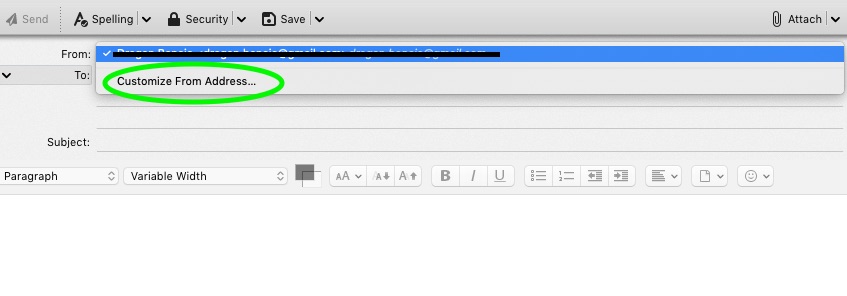
After this click "send". You may be asked to provide a password on this step.
Note: if your credentials are not correct, or if the sender is not authorized, you will get an appropriate error.