
Custom Attributes
On this page, you will learn how to insert, filter and delete your custom attributes
Custom Attributes
By using custom attributes, you can assign any information to the person that is not offered out of the box in standard fields. This way, you can enrich profiles to be able to create personalized and efficiently targeted messages.
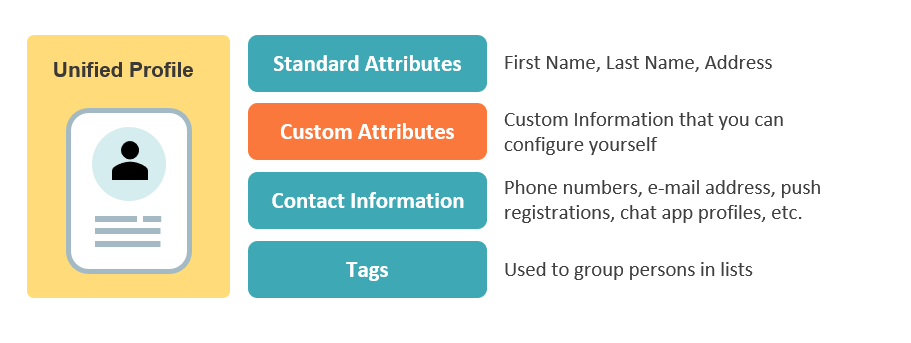
Custom attributes methods:
- Create custom attribute
- Get single custom attribute
- Get list of custom attributes
- Delete custom attribute
Resource
https://api.infobip.com/people/2/customAttributes
Model
UNIQUE IDENTIFIER
Each custom attribute can be addressed by name. A name is case-insensitive and must be unique in the system, which means that one cannot be assigned to multiple custom attributes. To address particular custom attribute you need to use URL encoded name
| Parameter | Type | Description | Limits |
|---|---|---|---|
| createdAt | string | a time when a custom attribute was created returned in method response | - |
| modifiedAt | string | a time when a custom attribute was modified returned in method response | - |
| name | string | custom attribute name | 256 characters max |
| dataType | string | custom attribute type | STRING, DECIMAL, INTEGER, BOOLEAN or DATE. Max value for DECIMAL and INTEGER is 9223372036854775807. Max value for STRING is 4096 characters. DATE is YYYY-MM-DD. |
Methods details
Create custom attribute
Create a new custom attribute by using this method:
Request:
POST /people/2/customAttributes HTTP/1.1
Host: api.infobip.com
Authorization: Basic QWxhZGRpbjpvcGVuIHNlc2FtZQ==
Accept: application/json

{
    "dataType": "DATE",
    "name": "Contract Expiry Date"
}
Response:
{
   "createdAt":"2018-01-09T12:39:52",
   "modifiedAt":"2018-01-09T12:39:52",
   "name":"Contract Expiry Date",
   "dataType":"DATE"
}
{
"value": 40002,
"message": "Duplicate"
}Duplicate custom attributes handling
If you try to create a custom attribute with a name that already exists in the system, you will get the following response:
{
    "value": 40002,
    "message": "Duplicate"
}
Get a single custom attribute
Get a single custom attribute using this method:
Request:
GET /people/2/customAttributes/Contract%20Expiry%20Date HTTP/1.1
Host: api.infobip.com
Authorization: Basic QWxhZGRpbjpvcGVuIHNlc2FtZQ==
Accept: application/json
Response:
{
    "createdAt": "2018-01-09T12:39:52",
    "modifiedAt": "2018-01-09T12:39:52",
    "name": "Contract Expiry Date",
    "dataType": "DATE"
}
Get a list of custom attributes
Use this method to get a list of custom attributes with pagination:
| Parameter | Type | Description |
|---|---|---|
limit |
int | If a limit count is given, no more than that many rows will be returned (but possibly less, if the query itself yields fewer rows). The default value is 100. |
page |
int | This parameter says to skip that many rows before beginning to return rows. If both *page *and *limit *appear, then page rows are skipped before starting to count the limit rows that are returned. The default value is 1. |
orderBy |
string | This parameter is used to order your results. If an order is not given, the default order name:asc will be applied. Possible ordering fields are name, createdAt and modifiedAt. Ordering direction can be specified with modifiers asc for the ascending ordering or desc for the descending one. |
Request:
GET /people/2/customAttributes/ HTTP/1.1
Host: api.infobip.com
Authorization: Basic QWxhZGRpbjpvcGVuIHNlc2FtZQ==
Accept: application/json
Response:
{
   "limit":20,
   "page":1,
   "orderBy":"modifiedAt:desc",
   "customAttributes":[
      {
         "createdAt":"2018-02-01T11:36:39",
         "modifiedAt":"2018-02-01T11:36:39",
         "name":"Company",
         "dataType":"STRING"
      },
      {
         "createdAt":"2018-02-01T11:36:39",
         "modifiedAt":"2018-02-01T11:36:39",
         "name":"Contract Expiry",
         "dataType":"DATE"
      }
   ]
}
Include total count
Add &includeTotalCount=true as a parameter to get a total count together with a list of custom attributes.
Delete the custom attribute
Use this method to delete the custom attribute:
Request:
DELETE /people/2/customAttributes/Contract%20Expiry%20Date HTTP/1.1
Host: api.infobip.com
Authorization: Basic QWxhZGRpbjpvcGVuIHNlc2FtZQ==
Accept: application/json
Response:
{
    "errorCode": 40404,
    "errorMessage": "Custom attribute does not exist"
}
Deleting a custom attribute which doesn't exist
If you try to delete a custom attribute which does not exist, you will get the following response:
{
    "errorCode": 40404,
    "errorMessage": "Custom attribute does not exist"
}