
OMNI Chat: Application
Manage the Omni Chat application on Infobip's platform.
Want to use the endless possibilities of omnichannel communication and reach your customers on their preferred channel?
The first step is creating an application on Infobip’s platform in order to use the Omni Chat API. The setup process starts with the application setup and continues with adding integrations for different channels you want to use.
The application represents a parent container for all integrations. Integration contains Chat channel information. For example, registering Facebook channel on Infobip’s platform is done by adding an integration with Facebook data to the application.
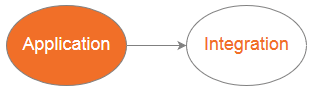
On this page, you will find the instructions on how to:
- Create a new Infobip application over API
- Update your Infobip application over API
- Retrieve your application over an API
- List all your applications over an API
Info
After you finish with the application setup, you can continue with the integration setup.
Create a new application
This method allows you to create a new application. During the creation, you will be able to add a webhook on which you would like to receive messages from your users from various channels.
https://api.infobip.com/omnichat/1/applications
Body parameters
| Parameter | Type | Required | Description |
|---|---|---|---|
| name | string | Yes | Name of the application. |
| webhookUrl | string | Optional | Webhook url. |
Request example
POST /omnichat/1/applications HTTP/1.1
Host: api.infobip.com
Authorization: Basic QWxhZGRpbjpvcGVuIHNlc2FtZQ==
Content-Type: application/json

{
  "name":"My first application",
  "webhookUrl":"http://www.myWebsite.com/chat/webhook"
}
Response
{
  "key":"0F3C3F29829FAB88714BA205BEC6D28F",
  "name":"My first application"
}
Response format
If successful, the response header HTTP status code will be 200 OK.
Otherwise, you will receive an error response status code. If you try to create an application without user’s authorization, you will receive a 401 Unauthorized error.
| Parameter | Type | Description |
|---|---|---|
| key | string | Application key. |
| name | string | Name of the application. |
Update application
This method allows you to update the existing application.
https://api.infobip.com/omnichat/1/applications/{applicationKey}
Body parameters
| Parameter | Type | Required | Description |
|---|---|---|---|
| name | string | Yes | Name of the application. |
| webhookUrl | string | Optional | Webhook url. |
Request example
PUT /omnichat/1/applications/0F3C3F29829FAB88714BA205BEC6D28F HTTP/1.1
Host: api.infobip.com
Authorization: Basic QWxhZGRpbjpvcGVuIHNlc2FtZQ==
Content-Type: application/json

{
  "name":"My first application",
  "webhookUrl":"http://www.myWebsite.com/chat/webhook"
}
Response
{
  "key":"0F3C3F29829FAB88714BA205BEC6D28F",
  "name":"My first application"
}
Response format
If successful, the response header HTTP status code will be 200 OK.
If not, you will receive an error response status code. If you try to create an application without the user’s authorization, you will receive a 401 Unauthorized error.
| Parameter | Type | Description |
|---|---|---|
| key | string | Application key. |
| name | string | Name of the application. |
Get application
Use this method to retrieve your application.
https://api.infobip.com/omnichat/1/applications/{applicationKey}
Request example
GET /omnichat/1/applications/0F3C3F29829FAB88714BA205BEC6D28F HTTP/1.1
Host: api.infobip.com
Authorization: Basic QWxhZGRpbjpvcGVuIHNlc2FtZQ==
Response
{
  "key":"0F3C3F29829FAB88714BA205BEC6D28F",
  "name":"My first application",
  "webhookUrl":"http://www.myWebsite.com/chat/webhook",
  "integrations":{}
}
Response format
If successful, the response header HTTP status code will be 200 OK.
If not, you will receive an error response status code. If you try to create an application without the user’s authorization, you will receive a 401 Unauthorized error.
| Parameter | Type | Description |
|---|---|---|
| key | string | Application key. |
| name | string | Name of the application. |
| integrations | Array | Array of Integrations. |
Get applications
Use this method to retrieve all of your applications
https://api.infobip.com/omnichat/1/applications
Request example
GET /omnichat/1/applications HTTP/1.1
Host: api.infobip.com
Authorization: Basic QWxhZGRpbjpvcGVuIHNlc2FtZQ==
Response
{
  "applications": [
    {
      "key":"0F3C3F29829FAB88714BA205BEC6D28F",
      "name":"My first application",
      "webhookUrl":"http://www.myWebsite.com/chat/webhook",
      "integrations":{}
    }
  ]
}
If successful, the response header HTTP status code will be 200 OK.
If not, you will receive an error response status code. If you try to create an application without the user’s authorization, you will receive a 401 Unauthorized error.
Get users
This method is used for getting application users.
https://api.infobip.com/omnichat/1/applications/{applicationKey}/users
Request example
GET /omnichat/1/applications/8F0792F86035A9F4290821F1EE6BC06A/users HTTP/1.1
Host: api.infobip.com
Authorization: Basic QWxhZGRpbjpvcGVuIHNlc2FtZQ==
Response example
[
    {
        "key": "A39311A5543180632DF25F8CE63BD21C28C12E83BC83D449BC4A9F32F1AE3C3E",
        "integrationType": "FACEBOOK"
    },
    {
        "key": "24F8599DF1A67F0DDF4BC67CC3D9AF8028C12E83BC83D449BC4A9F32F1AE3C3E",
        "integrationType": "FACEBOOK",
        "firstName": "firstName",
        "lastName": "lastName"
    },
    {
        "key": "7E705E15013B7576976160386C42F61E",
        "integrationType": "TELEGRAM",
        "firstName": "firstName"
    },
    {
        "key": "986ABBBD989A7430A27439B955F2AEDA",
        "integrationType": "TELEGRAM",
        "firstName": "firstName",
    	"lastName": "lastName",
      	"username": "username"
    }
]