
Create IVR
The easiest way to build a high-quality IVR in the cloud.
Below are examples and instructions for how to use inbound or outbound IVR with your customers.
Create a scenario and link it with an inbound or outbound flow by following these steps:
- Create scenario using available actions.
- Once you have done the first step, you will have a scenarioID. You may read and update your scenario or get the list of all scenarios created by you.
- Use a scenarioID for the Setup of inbound IVR or Launch of an outbound IVR.
Browse our list of simple or more complex IVR scenarios before starting to build your own.
IVR scenario
Scenario is the major element of the IVR. Create it carefully and remember that simple scenarios are better for you and your customers.
Available methods:
Create scenario
Create scenario API is a simple REST API with a well-structured body. In the response, you will get the ScenarioID to be used for the IVR flow on inbound or outbound calls.
Use this method to create a new scenario:
POST https://api.infobip.com/voice/ivr/1/scenarios
| Parameter | Type | Description |
|---|---|---|
| name (required) | string | Scenario name. |
| description | string | Scenario description. |
| script (required) | array | List scenario's action. |
Request example
Request:
POST /voice/ivr/1/scenarios HTTP/1.1
Host: api.infobip.com
Authorization: Basic QWxhZGRpbjpvcGVuIHNlc2FtZQ==
Content-Type: application/json
Accept: application/json

{
  "name": "scenario",
  "description": "This simple scenario is used as an example how to implement two actions (say and hangup).",
  "script": [
{
    "say": "Dear Customer, we will show you how to use create, read, update, delete scenarios methods.",
    "options": {
        "speechRate": 1,
        "language": "en",
        "voice": {
            "name": "Joanna",
            "gender": "female"
        }
    }
},
    "hangup"
  ]
}
curl -X POST \
  'https://{base_url}/voice/ivr/1/scenarios' \
  -H 'Accept: application/json' \
  -H 'Authorization: Basic QWxhZGRpbjpvcGVuIHNlc2FtZQ==' \
  -H 'Content-Type: application/json' \
  -d '{
    "name": "scenario",
    "description": "This simple scenario is used as an example how to implement two actions (say and hangup).",
    "script": [
        {
            "say": "Dear Customer, we will show you how to use create, read, update, delete scenarios methods.",
            "options": {
                "speechRate": 1,
                "language": "en",
                "voice": {
                    "name": "Joanna",
                    "gender": "female"
                }
            }
        },
        "hangup"
    ]
}'
<?php

$curl = curl_init();

curl_setopt_array($curl, array(
  CURLOPT_URL => "https://{base_url}/voice/ivr/1/scenarios",
  CURLOPT_RETURNTRANSFER => true,
  CURLOPT_ENCODING => "",
  CURLOPT_MAXREDIRS => 10,
  CURLOPT_TIMEOUT => 30,
  CURLOPT_HTTP_VERSION => CURL_HTTP_VERSION_1_1,
  CURLOPT_CUSTOMREQUEST => "POST",
  CURLOPT_POSTFIELDS => "{\n    \"name\": \"scenario\",\n    \"description\": \"This simple scenario is used as an example how to implement two actions (say and hangup).\",\n    \"script\": [\n        {\n            \"say\": \"Dear Customer, we will show you how to use create, read, update, delete scenarios methods.\",\n            \"options\": {\n                \"speechRate\": 1,\n                \"language\": \"en\",\n                \"voice\": {\n                    \"name\": \"Joanna\",\n                    \"gender\": \"female\"\n                }\n            }\n        },\n        \"hangup\"\n    ]\n}",
  CURLOPT_HTTPHEADER => array(
    "Accept: application/json",
    "Authorization: Basic QWxhZGRpbjpvcGVuIHNlc2FtZQ==",
    "Content-Type: application/json"
  ),
));

$response = curl_exec($curl);
$err = curl_error($curl);

curl_close($curl);

if ($err) {
  echo "cURL Error #:" . $err;
} else {
  echo $response;
}
require 'uri'
require 'net/http'

url = URI("https://{base_url}/voice/ivr/1/scenarios")

http = Net::HTTP.new(url.host, url.port)

request = Net::HTTP::Post.new(url)
request["Authorization"] = 'Basic QWxhZGRpbjpvcGVuIHNlc2FtZQ=='
request["Accept"] = 'application/json'
request["Content-Type"] = 'application/json'
request.body = "{\n    \"name\": \"scenario\",\n    \"description\": \"This simple scenario is used as an example how to implement two actions (say and hangup).\",\n    \"script\": [\n        {\n            \"say\": \"Dear Customer, we will show you how to use create, read, update, delete scenarios methods.\",\n            \"options\": {\n                \"speechRate\": 1,\n                \"language\": \"en\",\n                \"voice\": {\n                    \"name\": \"Joanna\",\n                    \"gender\": \"female\"\n                }\n            }\n        },\n        \"hangup\"\n    ]\n}"

response = http.request(request)
puts response.read_body
import http.client

conn = http.client.HTTPConnection("{base_url}")

payload = "{\n    \"name\": \"scenario\",\n    \"description\": \"This simple scenario is used as an example how to implement two actions (say and hangup).\",\n    \"script\": [\n        {\n            \"say\": \"Dear Customer, we will show you how to use create, read, update, delete scenarios methods.\",\n            \"options\": {\n                \"speechRate\": 1,\n                \"language\": \"en\",\n                \"voice\": {\n                    \"name\": \"Joanna\",\n                    \"gender\": \"female\"\n                }\n            }\n        },\n        \"hangup\"\n    ]\n}"

headers = {
    'Authorization': "Basic QWxhZGRpbjpvcGVuIHNlc2FtZQ==",
    'Accept': "application/json",
    'Content-Type': "application/json"
    }

conn.request("POST", "voice,ivr,1,scenarios", payload, headers)

res = conn.getresponse()
data = res.read()

print(data.decode("utf-8"))
HttpResponse<String> response = Unirest.post("https://{base_url}/voice/ivr/1/scenarios")
  .header("Authorization", "Basic QWxhZGRpbjpvcGVuIHNlc2FtZQ==")
  .header("Accept", "application/json")
  .header("Content-Type", "application/json")
  .body("{\n    \"name\": \"scenario\",\n    \"description\": \"This simple scenario is used as an example how to implement two actions (say and hangup).\",\n    \"script\": [\n        {\n            \"say\": \"Dear Customer, we will show you how to use create, read, update, delete scenarios methods.\",\n            \"options\": {\n                \"speechRate\": 1,\n                \"language\": \"en\",\n                \"voice\": {\n                    \"name\": \"Joanna\",\n                    \"gender\": \"female\"\n                }\n            }\n        },\n        \"hangup\"\n    ]\n}")
  .asString();
var client = new RestClient("https://{base_url}/voice/ivr/1/scenarios");
var request = new RestRequest(Method.POST);
request.AddHeader("Content-Type", "application/json");
request.AddHeader("Accept", "application/json");
request.AddHeader("Authorization", "Basic QWxhZGRpbjpvcGVuIHNlc2FtZQ==");
request.AddParameter("undefined", "{\n    \"name\": \"scenario\",\n    \"description\": \"This simple scenario is used as an example how to implement two actions (say and hangup).\",\n    \"script\": [\n        {\n            \"say\": \"Dear Customer, we will show you how to use create, read, update, delete scenarios methods.\",\n            \"options\": {\n                \"speechRate\": 1,\n                \"language\": \"en\",\n                \"voice\": {\n                    \"name\": \"Joanna\",\n                    \"gender\": \"female\"\n                }\n            }\n        },\n        \"hangup\"\n    ]\n}", ParameterType.RequestBody);
IRestResponse response = client.Execute(request);
var data = JSON.stringify({
  "name": "scenario",
  "description": "This simple scenario is used as an example how to implement two actions (say and hangup).",
  "script": [
    {
      "say": "Dear Customer, we will show you how to use create, read, update, delete scenarios methods.",
      "options": {
        "speechRate": 1,
        "language": "en",
        "voice": {
          "name": "Joanna",
          "gender": "female"
        }
      }
    },
    "hangup"
  ]
});

var xhr = new XMLHttpRequest();
xhr.withCredentials = true;

xhr.addEventListener("readystatechange", function () {
  if (this.readyState === 4) {
    console.log(this.responseText);
  }
});

xhr.open("POST", "https://{base_url}/voice/ivr/1/scenarios");
xhr.setRequestHeader("Authorization", "Basic QWxhZGRpbjpvcGVuIHNlc2FtZQ==");
xhr.setRequestHeader("Accept", "application/json");
xhr.setRequestHeader("Content-Type", "application/json");

xhr.send(data);
Response format
{
  "id": "E83E787CF2613450157ADA3476171E3F",
  "name": "scenario",
  "description": "This simple scenario is used as an example how to implement two actions (say and hangup).",
  "createTime": "2017-10-03T12:36:01.667+0000",
  "updateTime": null,
  "script": [
    {
    "say": "Dear Customer, we will show you how to use create, read, update, delete scenarios methods.",
    "options": {
        "speechRate": 1,
        "language": "en",
        "voice": {
            "name": "Joanna",
            "gender": "female"
        }
    }
},
    "hangup"
  ],
}
Read scenario
Use this method to read the specific scenario by using the (scenario) name parameter or read all scenarios you have created.
Use this method to read scenarios:
GET https://api.infobip.com/voice/ivr/1/scenarios
| Parameter | Type | Description |
|---|---|---|
| name (required) | String (Default = "") | Scenario name. |
| page | Integer (Default = 1) | Scenario description. |
| pageSize (required) | Integer (Default = 50) | Number of rows in one page. |
Request without parameters will return the first 50 scenarios ordered by name.
Request example without parameters
GET /voice/ivr/1/scenarios HTTP/1.1
Host: api.infobip.com
Authorization: Basic QWxhZGRpbjpvcGVuIHNlc2FtZQ==
Accept: application/json
curl -X GET \
  'https://{base_url}/voice/ivr/1/scenarios' \
  -H 'Accept: application/json' \
  -H 'Authorization: Basic QWxhZGRpbjpvcGVuIHNlc2FtZQ=='
<?php

$curl = curl_init();

curl_setopt_array($curl, array(
  CURLOPT_URL => "https://{base_url}/voice/ivr/1/scenarios",
  CURLOPT_RETURNTRANSFER => true,
  CURLOPT_ENCODING => "",
  CURLOPT_MAXREDIRS => 10,
  CURLOPT_TIMEOUT => 30,
  CURLOPT_HTTP_VERSION => CURL_HTTP_VERSION_1_1,
  CURLOPT_CUSTOMREQUEST => "GET",
  CURLOPT_HTTPHEADER => array(
    "Accept: application/json",
    "Authorization: Basic QWxhZGRpbjpvcGVuIHNlc2FtZQ=="
  ),
));

$response = curl_exec($curl);
$err = curl_error($curl);

curl_close($curl);

if ($err) {
  echo "cURL Error #:" . $err;
} else {
  echo $response;
}
require 'uri'
require 'net/http'

url = URI("https://{base_url}/voice/ivr/1/scenarios")

http = Net::HTTP.new(url.host, url.port)

request = Net::HTTP::Get.new(url)
request["Authorization"] = 'Basic QWxhZGRpbjpvcGVuIHNlc2FtZQ=='
request["Accept"] = 'application/json'

response = http.request(request)
puts response.read_body
import http.client

conn = http.client.HTTPConnection("{base_url}")

headers = {
    'Authorization': "Basic QWxhZGRpbjpvcGVuIHNlc2FtZQ==",
    'Accept': "application/json"
    }

conn.request("GET", "voice,ivr,1,scenarios", headers=headers)

res = conn.getresponse()
data = res.read()

print(data.decode("utf-8"))
HttpResponse<String> response = Unirest.get("https://{base_url}/voice/ivr/1/scenarios")
  .header("Authorization", "Basic QWxhZGRpbjpvcGVuIHNlc2FtZQ==")
  .header("Accept", "application/json")
  .asString();
var client = new RestClient("https://{base_url}/voice/ivr/1/scenarios");
var request = new RestRequest(Method.GET);
request.AddHeader("Accept", "application/json");
request.AddHeader("Authorization", "Basic QWxhZGRpbjpvcGVuIHNlc2FtZQ==");
IRestResponse response = client.Execute(request);
var data = null;

var xhr = new XMLHttpRequest();
xhr.withCredentials = true;

xhr.addEventListener("readystatechange", function () {
  if (this.readyState === 4) {
    console.log(this.responseText);
  }
});

xhr.open("GET", "https://{base_url}/voice/ivr/1/scenarios");
xhr.setRequestHeader("Authorization", "Basic QWxhZGRpbjpvcGVuIHNlc2FtZQ==");
xhr.setRequestHeader("Accept", "application/json");

xhr.send(data);
Response example without parameters
[
  {
    "id": "E83E787CF2613450157ADA3476171E3F",
    "name": "scenario",
    "description": "This simple scenario is used as an example how to implement two actions (say and hangup).",
    "createTime": "2017-10-03T12:36:01.667+0000",
    "updateTime": null,
    "script": [
      {
        "say": "Dear Customer, we will show you how to use create, read, update, delete scenarios methods."
      },
      "hangup"
    ]
  }
]
Request with parameters example
GET /voice/ivr/1/scenarios?page=1&pageSize=30&name=Scenario HTTP/1.1
Host: api.infobip.com
Authorization: Basic QWxhZGRpbjpvcGVuIHNlc2FtZQ==
Accept: application/json
curl -X GET \
  'https://{base_url}/voice/ivr/1/scenarios?page=1&pageSize=30&name=Scenario' \
  -H 'Accept: application/json' \
  -H 'Authorization: Basic QWxhZGRpbjpvcGVuIHNlc2FtZQ=='
<?php

$curl = curl_init();

curl_setopt_array($curl, array(
  CURLOPT_URL => "https://{base_url}/voice/ivr/1/scenarios?page=1&pageSize=30&name=Scenario",
  CURLOPT_RETURNTRANSFER => true,
  CURLOPT_ENCODING => "",
  CURLOPT_MAXREDIRS => 10,
  CURLOPT_TIMEOUT => 30,
  CURLOPT_HTTP_VERSION => CURL_HTTP_VERSION_1_1,
  CURLOPT_CUSTOMREQUEST => "GET",
  CURLOPT_HTTPHEADER => array(
    "Accept: application/json",
    "Authorization: Basic QWxhZGRpbjpvcGVuIHNlc2FtZQ=="
  ),
));

$response = curl_exec($curl);
$err = curl_error($curl);

curl_close($curl);

if ($err) {
  echo "cURL Error #:" . $err;
} else {
  echo $response;
}
require 'uri'
require 'net/http'

url = URI("https://{base_url}/voice/ivr/1/scenarios?page=1&pageSize=30&name=Scenario")

http = Net::HTTP.new(url.host, url.port)

request = Net::HTTP::Get.new(url)
request["Authorization"] = 'Basic QWxhZGRpbjpvcGVuIHNlc2FtZQ=='
request["Accept"] = 'application/json'

response = http.request(request)
puts response.read_body
import http.client

conn = http.client.HTTPConnection("{base_url}")

headers = {
    'Authorization': "Basic QWxhZGRpbjpvcGVuIHNlc2FtZQ==",
    'Accept': "application/json"
    }

conn.request("GET", "voice,ivr,1,scenarios", headers=headers)

res = conn.getresponse()
data = res.read()

print(data.decode("utf-8"))
HttpResponse<String> response = Unirest.get("https://{base_url}/voice/ivr/1/scenarios?page=1&pageSize=30&name=Scenario")
  .header("Authorization", "Basic QWxhZGRpbjpvcGVuIHNlc2FtZQ==")
  .header("Accept", "application/json")
  .asString();
var client = new RestClient("https://{base_url}/voice/ivr/1/scenarios?page=1&pageSize=30&name=Scenario");
var request = new RestRequest(Method.GET);
request.AddHeader("Accept", "application/json");
request.AddHeader("Authorization", "Basic QWxhZGRpbjpvcGVuIHNlc2FtZQ==");
IRestResponse response = client.Execute(request);
var data = null;

var xhr = new XMLHttpRequest();
xhr.withCredentials = true;

xhr.addEventListener("readystatechange", function () {
  if (this.readyState === 4) {
    console.log(this.responseText);
  }
});

xhr.open("GET", "https://{base_url}/voice/ivr/1/scenarios?page=1&pageSize=30&name=Scenario");
xhr.setRequestHeader("Authorization", "Basic QWxhZGRpbjpvcGVuIHNlc2FtZQ==");
xhr.setRequestHeader("Accept", "application/json");

xhr.send(data);
Response format
[
  {
    "id": "E83E787CF2613450157ADA3476171E3F",
    "name": "scenario",
    "description": "This simple scenario is used as an example how to implement two actions (say and hangup).",
    "createTime": "2017-10-03T12:36:01.667+0000",
    "updateTime": null,
    "script": [
      {
        "say": "Dear Customer, we will show you how to use create, read, update, delete scenarios methods."
      },
      "hangup"
    ]
  }
]
Update the scenario
Use this method to update an existing scenario.
PUT https://api.infobip.com/voice/ivr/1/scenarios/{Id}
Request example
PUT /voice/ivr/1/scenarios/E83E787CF2613450157ADA3476171E3F HTTP/1.1
Host: api.infobip.com
Authorization: Basic QWxhZGRpbjpvcGVuIHNlc2FtZQ==
Content-Type: application/json
Accept: application/json

{
  "name": "scenario",
  "description" :"This scenario is used as an example how to implement all actions. ",
  "script": [
    {
      "repeat": [
        {
          "say": "Dear Customer, we will show you all action in one example. If you want perform dial action press one. Press two to play a message from url. Three in this case is reserved for call web api's POST method. If you want call web api's GET method press four. For web api's PUT method you will press five. Exit is your choice, press asterisk."
        },
        {
          "collectInto": "myVariable",
          "options": {
            "maxInputLength": 1
          }
        },
        {
          "switch": "myVariable",
          "case": {
            "1": [
              {
                "dial": "41793026731"
              }
            ],
            "2": [
              {
                "playFromUrl": "http://www.example.com/voice/advanced"
              }
            ],
            "3": [
              {
                "request": "https://requestb.in/12345",
                "options": {
                  "method": "POST",
                  "headers": {
                    "content-type": "application/json"
                  },
                  "body": {
                    "payload": "${to} finished the IVR."
                  }
                }
              }

            ],
            "4": [
              {
                "request": "https://requestb.in/12345",
                "options": {
                  "method": "GET",
                  "collectResponse": true
                }
              }
            ],
            "5": [
              {
                "request": "https://requestb.in/12345",
                "options": {
                  "method": "PUT",
                  "headers": {
                    "content-type": "application/xml",
                    "accept": "application/xml"
                  },
                  "body": "<request><payload>${to} finished the IVR.</payload></request>",
                  "collectResponse": true
                }
              }
            ],
            "__default": [
              {
                "say": "Dear Customer, you pressed a wrong number. Please, try again."
              }
            ]
          }
        }
      ],
      "until": "${myVariable} != *"
    },
    "hangup"
  ]
}
curl -X PUT \
  'https://{base_url}/voice/ivr/1/scenarios/E83E787CF2613450157ADA3476171E3F' \
  -H 'Accept: application/json' \
  -H 'Authorization: Basic QWxhZGRpbjpvcGVuIHNlc2FtZQ==' \
  -H 'Content-Type: application/json' \
  -d '{
    "name": "scenario",
    "description": "This scenario is used as an example how to implement all actions. ",
    "script": [
        {
            "repeat": [
                {
                    "say": "Dear Customer, we will show you all action in one example. If you want perform dial action press one. Press two to play a message from url. Three in this case is reserved for call web api'\''s POST method. If you want call web api'\''s GET method press four. For web api'\''s PUT method you will press five. Exit is your choice, press asterisk."
                },
                {
                    "collectInto": "myVariable",
                    "options": {
                        "maxInputLength": 1
                    }
                },
                {
                    "switch": "myVariable",
                    "case": {
                        "1": [
                            {
                                "dial": "41793026731"
                            }
                        ],
                        "2": [
                            {
                                "playFromUrl": "http://www.example.com/voice/advanced"
                            }
                        ],
                        "3": [
                            {
                                "request": "https://requestb.in/12345",
                                "options": {
                                    "method": "POST",
                                    "headers": {
                                        "content-type": "application/json"
                                    },
                                    "body": {
                                        "payload": "${to} finished the IVR."
                                    }
                                }
                            }
                        ],
                        "4": [
                            {
                                "request": "https://requestb.in/12345",
                                "options": {
                                    "method": "GET",
                                    "collectResponse": true
                                }
                            }
                        ],
                        "5": [
                            {
                                "request": "https://requestb.in/12345",
                                "options": {
                                    "method": "PUT",
                                    "headers": {
                                        "content-type": "application/xml",
                                        "accept": "application/xml"
                                    },
                                    "body": "<request><payload>${to} finished the IVR.</payload></request>",
                                    "collectResponse": true
                                }
                            }
                        ],
                        "__default": [
                            {
                                "say": "Dear Customer, you pressed a wrong number. Please, try again."
                            }
                        ]
                    }
                }
            ],
            "until": "${myVariable} != *"
        },
        "hangup"
    ]
}'
<?php

$curl = curl_init();

curl_setopt_array($curl, array(
  CURLOPT_URL => "https://{base_url}/voice/ivr/1/scenarios/E83E787CF2613450157ADA3476171E3F",
  CURLOPT_RETURNTRANSFER => true,
  CURLOPT_ENCODING => "",
  CURLOPT_MAXREDIRS => 10,
  CURLOPT_TIMEOUT => 30,
  CURLOPT_HTTP_VERSION => CURL_HTTP_VERSION_1_1,
  CURLOPT_CUSTOMREQUEST => "PUT",
  CURLOPT_POSTFIELDS => "{\n    \"name\": \"scenario\",\n    \"description\": \"This scenario is used as an example how to implement all actions. \",\n    \"script\": [\n        {\n            \"repeat\": [\n                {\n                    \"say\": \"Dear Customer, we will show you all action in one example. If you want perform dial action press one. Press two to play a message from url. Three in this case is reserved for call web api's POST method. If you want call web api's GET method press four. For web api's PUT method you will press five. Exit is your choice, press asterisk.\"\n                },\n                {\n                    \"collectInto\": \"myVariable\",\n                    \"options\": {\n                        \"maxInputLength\": 1\n                    }\n                },\n                {\n                    \"switch\": \"myVariable\",\n                    \"case\": {\n                        \"1\": [\n                            {\n                                \"dial\": \"41793026731\"\n                            }\n                        ],\n                        \"2\": [\n                            {\n                                \"playFromUrl\": \"http://www.example.com/voice/advanced\"\n                            }\n                        ],\n                        \"3\": [\n                            {\n                                \"request\": \"https://requestb.in/12345\",\n                                \"options\": {\n                                    \"method\": \"POST\",\n                                    \"headers\": {\n                                        \"content-type\": \"application/json\"\n                                    },\n                                    \"body\": {\n                                        \"payload\": \"${to} finished the IVR.\"\n                                    }\n                                }\n                            }\n                        ],\n                        \"4\": [\n                            {\n                                \"request\": \"https://requestb.in/12345\",\n                                \"options\": {\n                                    \"method\": \"GET\",\n                                    \"collectResponse\": true\n                                }\n                            }\n                        ],\n                        \"5\": [\n                            {\n                                \"request\": \"https://requestb.in/12345\",\n                                \"options\": {\n                                    \"method\": \"PUT\",\n                                    \"headers\": {\n                                        \"content-type\": \"application/xml\",\n                                        \"accept\": \"application/xml\"\n                                    },\n                                    \"body\": \"<request><payload>${to} finished the IVR.</payload></request>\",\n                                    \"collectResponse\": true\n                                }\n                            }\n                        ],\n                        \"__default\": [\n                            {\n                                \"say\": \"Dear Customer, you pressed a wrong number. Please, try again.\"\n                            }\n                        ]\n                    }\n                }\n            ],\n            \"until\": \"${myVariable} != *\"\n        },\n        \"hangup\"\n    ]\n}",
  CURLOPT_HTTPHEADER => array(
    "Accept: application/json",
    "Authorization: Basic QWxhZGRpbjpvcGVuIHNlc2FtZQ==",
    "Content-Type: application/json"
  ),
));

$response = curl_exec($curl);
$err = curl_error($curl);

curl_close($curl);

if ($err) {
  echo "cURL Error #:" . $err;
} else {
  echo $response;
}
require 'uri'
require 'net/http'

url = URI("https://{base_url}/voice/ivr/1/scenarios/E83E787CF2613450157ADA3476171E3F")

http = Net::HTTP.new(url.host, url.port)

request = Net::HTTP::Put.new(url)
request["Authorization"] = 'Basic QWxhZGRpbjpvcGVuIHNlc2FtZQ=='
request["Accept"] = 'application/json'
request["Content-Type"] = 'application/json'
request.body = "{\n    \"name\": \"scenario\",\n    \"description\": \"This scenario is used as an example how to implement all actions. \",\n    \"script\": [\n        {\n            \"repeat\": [\n                {\n                    \"say\": \"Dear Customer, we will show you all action in one example. If you want perform dial action press one. Press two to play a message from url. Three in this case is reserved for call web api's POST method. If you want call web api's GET method press four. For web api's PUT method you will press five. Exit is your choice, press asterisk.\"\n                },\n                {\n                    \"collectInto\": \"myVariable\",\n                    \"options\": {\n                        \"maxInputLength\": 1\n                    }\n                },\n                {\n                    \"switch\": \"myVariable\",\n                    \"case\": {\n                        \"1\": [\n                            {\n                                \"dial\": \"41793026731\"\n                            }\n                        ],\n                        \"2\": [\n                            {\n                                \"playFromUrl\": \"http://www.example.com/voice/advanced\"\n                            }\n                        ],\n                        \"3\": [\n                            {\n                                \"request\": \"https://requestb.in/12345\",\n                                \"options\": {\n                                    \"method\": \"POST\",\n                                    \"headers\": {\n                                        \"content-type\": \"application/json\"\n                                    },\n                                    \"body\": {\n                                        \"payload\": \"${to} finished the IVR.\"\n                                    }\n                                }\n                            }\n                        ],\n                        \"4\": [\n                            {\n                                \"request\": \"https://requestb.in/12345\",\n                                \"options\": {\n                                    \"method\": \"GET\",\n                                    \"collectResponse\": true\n                                }\n                            }\n                        ],\n                        \"5\": [\n                            {\n                                \"request\": \"https://requestb.in/12345\",\n                                \"options\": {\n                                    \"method\": \"PUT\",\n                                    \"headers\": {\n                                        \"content-type\": \"application/xml\",\n                                        \"accept\": \"application/xml\"\n                                    },\n                                    \"body\": \"<request><payload>${to} finished the IVR.</payload></request>\",\n                                    \"collectResponse\": true\n                                }\n                            }\n                        ],\n                        \"__default\": [\n                            {\n                                \"say\": \"Dear Customer, you pressed a wrong number. Please, try again.\"\n                            }\n                        ]\n                    }\n                }\n            ],\n            \"until\": \"${myVariable} != *\"\n        },\n        \"hangup\"\n    ]\n}"

response = http.request(request)
puts response.read_body
import http.client

conn = http.client.HTTPConnection("{base_url}")

payload = "{\n    \"name\": \"scenario\",\n    \"description\": \"This scenario is used as an example how to implement all actions. \",\n    \"script\": [\n        {\n            \"repeat\": [\n                {\n                    \"say\": \"Dear Customer, we will show you all action in one example. If you want perform dial action press one. Press two to play a message from url. Three in this case is reserved for call web api's POST method. If you want call web api's GET method press four. For web api's PUT method you will press five. Exit is your choice, press asterisk.\"\n                },\n                {\n                    \"collectInto\": \"myVariable\",\n                    \"options\": {\n                        \"maxInputLength\": 1\n                    }\n                },\n                {\n                    \"switch\": \"myVariable\",\n                    \"case\": {\n                        \"1\": [\n                            {\n                                \"dial\": \"41793026731\"\n                            }\n                        ],\n                        \"2\": [\n                            {\n                                \"playFromUrl\": \"http://www.example.com/voice/advanced\"\n                            }\n                        ],\n                        \"3\": [\n                            {\n                                \"request\": \"https://requestb.in/12345\",\n                                \"options\": {\n                                    \"method\": \"POST\",\n                                    \"headers\": {\n                                        \"content-type\": \"application/json\"\n                                    },\n                                    \"body\": {\n                                        \"payload\": \"${to} finished the IVR.\"\n                                    }\n                                }\n                            }\n                        ],\n                        \"4\": [\n                            {\n                                \"request\": \"https://requestb.in/12345\",\n                                \"options\": {\n                                    \"method\": \"GET\",\n                                    \"collectResponse\": true\n                                }\n                            }\n                        ],\n                        \"5\": [\n                            {\n                                \"request\": \"https://requestb.in/12345\",\n                                \"options\": {\n                                    \"method\": \"PUT\",\n                                    \"headers\": {\n                                        \"content-type\": \"application/xml\",\n                                        \"accept\": \"application/xml\"\n                                    },\n                                    \"body\": \"<request><payload>${to} finished the IVR.</payload></request>\",\n                                    \"collectResponse\": true\n                                }\n                            }\n                        ],\n                        \"__default\": [\n                            {\n                                \"say\": \"Dear Customer, you pressed a wrong number. Please, try again.\"\n                            }\n                        ]\n                    }\n                }\n            ],\n            \"until\": \"${myVariable} != *\"\n        },\n        \"hangup\"\n    ]\n}"

headers = {
    'Authorization': "Basic QWxhZGRpbjpvcGVuIHNlc2FtZQ==",
    'Accept': "application/json",
    'Content-Type': "application/json"
    }

conn.request("PUT", "voice,ivr,1,scenarios,E83E787CF2613450157ADA3476171E3F", payload, headers)

res = conn.getresponse()
data = res.read()

print(data.decode("utf-8"))
HttpResponse<String> response = Unirest.put("https://{base_url}/voice/ivr/1/scenarios/E83E787CF2613450157ADA3476171E3F")
  .header("Authorization", "Basic QWxhZGRpbjpvcGVuIHNlc2FtZQ==")
  .header("Accept", "application/json")
  .header("Content-Type", "application/json")
  .body("{\n    \"name\": \"scenario\",\n    \"description\": \"This scenario is used as an example how to implement all actions. \",\n    \"script\": [\n        {\n            \"repeat\": [\n                {\n                    \"say\": \"Dear Customer, we will show you all action in one example. If you want perform dial action press one. Press two to play a message from url. Three in this case is reserved for call web api's POST method. If you want call web api's GET method press four. For web api's PUT method you will press five. Exit is your choice, press asterisk.\"\n                },\n                {\n                    \"collectInto\": \"myVariable\",\n                    \"options\": {\n                        \"maxInputLength\": 1\n                    }\n                },\n                {\n                    \"switch\": \"myVariable\",\n                    \"case\": {\n                        \"1\": [\n                            {\n                                \"dial\": \"41793026731\"\n                            }\n                        ],\n                        \"2\": [\n                            {\n                                \"playFromUrl\": \"http://www.example.com/voice/advanced\"\n                            }\n                        ],\n                        \"3\": [\n                            {\n                                \"request\": \"https://requestb.in/12345\",\n                                \"options\": {\n                                    \"method\": \"POST\",\n                                    \"headers\": {\n                                        \"content-type\": \"application/json\"\n                                    },\n                                    \"body\": {\n                                        \"payload\": \"${to} finished the IVR.\"\n                                    }\n                                }\n                            }\n                        ],\n                        \"4\": [\n                            {\n                                \"request\": \"https://requestb.in/12345\",\n                                \"options\": {\n                                    \"method\": \"GET\",\n                                    \"collectResponse\": true\n                                }\n                            }\n                        ],\n                        \"5\": [\n                            {\n                                \"request\": \"https://requestb.in/12345\",\n                                \"options\": {\n                                    \"method\": \"PUT\",\n                                    \"headers\": {\n                                        \"content-type\": \"application/xml\",\n                                        \"accept\": \"application/xml\"\n                                    },\n                                    \"body\": \"<request><payload>${to} finished the IVR.</payload></request>\",\n                                    \"collectResponse\": true\n                                }\n                            }\n                        ],\n                        \"__default\": [\n                            {\n                                \"say\": \"Dear Customer, you pressed a wrong number. Please, try again.\"\n                            }\n                        ]\n                    }\n                }\n            ],\n            \"until\": \"${myVariable} != *\"\n        },\n        \"hangup\"\n    ]\n}")
  .asString();
var client = new RestClient("https://{base_url}/voice/ivr/1/scenarios/E83E787CF2613450157ADA3476171E3F");
var request = new RestRequest(Method.PUT);
request.AddHeader("Content-Type", "application/json");
request.AddHeader("Accept", "application/json");
request.AddHeader("Authorization", "Basic QWxhZGRpbjpvcGVuIHNlc2FtZQ==");
request.AddParameter("undefined", "{\n    \"name\": \"scenario\",\n    \"description\": \"This scenario is used as an example how to implement all actions. \",\n    \"script\": [\n        {\n            \"repeat\": [\n                {\n                    \"say\": \"Dear Customer, we will show you all action in one example. If you want perform dial action press one. Press two to play a message from url. Three in this case is reserved for call web api's POST method. If you want call web api's GET method press four. For web api's PUT method you will press five. Exit is your choice, press asterisk.\"\n                },\n                {\n                    \"collectInto\": \"myVariable\",\n                    \"options\": {\n                        \"maxInputLength\": 1\n                    }\n                },\n                {\n                    \"switch\": \"myVariable\",\n                    \"case\": {\n                        \"1\": [\n                            {\n                                \"dial\": \"41793026731\"\n                            }\n                        ],\n                        \"2\": [\n                            {\n                                \"playFromUrl\": \"http://www.example.com/voice/advanced\"\n                            }\n                        ],\n                        \"3\": [\n                            {\n                                \"request\": \"https://requestb.in/12345\",\n                                \"options\": {\n                                    \"method\": \"POST\",\n                                    \"headers\": {\n                                        \"content-type\": \"application/json\"\n                                    },\n                                    \"body\": {\n                                        \"payload\": \"${to} finished the IVR.\"\n                                    }\n                                }\n                            }\n                        ],\n                        \"4\": [\n                            {\n                                \"request\": \"https://requestb.in/12345\",\n                                \"options\": {\n                                    \"method\": \"GET\",\n                                    \"collectResponse\": true\n                                }\n                            }\n                        ],\n                        \"5\": [\n                            {\n                                \"request\": \"https://requestb.in/12345\",\n                                \"options\": {\n                                    \"method\": \"PUT\",\n                                    \"headers\": {\n                                        \"content-type\": \"application/xml\",\n                                        \"accept\": \"application/xml\"\n                                    },\n                                    \"body\": \"<request><payload>${to} finished the IVR.</payload></request>\",\n                                    \"collectResponse\": true\n                                }\n                            }\n                        ],\n                        \"__default\": [\n                            {\n                                \"say\": \"Dear Customer, you pressed a wrong number. Please, try again.\"\n                            }\n                        ]\n                    }\n                }\n            ],\n            \"until\": \"${myVariable} != *\"\n        },\n        \"hangup\"\n    ]\n}", ParameterType.RequestBody);
IRestResponse response = client.Execute(request);
var data = JSON.stringify({
  "name": "scenario",
  "description": "This scenario is used as an example how to implement all actions. ",
  "script": [
    {
      "repeat": [
        {
          "say": "Dear Customer, we will show you all action in one example. If you want perform dial action press one. Press two to play a message from url. Three in this case is reserved for call web api's POST method. If you want call web api's GET method press four. For web api's PUT method you will press five. Exit is your choice, press asterisk."
        },
        {
          "collectInto": "myVariable",
          "options": {
            "maxInputLength": 1
          }
        },
        {
          "switch": "myVariable",
          "case": {
            "1": [
              {
                "dial": "41793026731"
              }
            ],
            "2": [
              {
                "playFromUrl": "http://www.example.com/voice/advanced"
              }
            ],
            "3": [
              {
                "request": "https://requestb.in/12345",
                "options": {
                  "method": "POST",
                  "headers": {
                    "content-type": "application/json"
                  },
                  "body": {
                    "payload": "${to} finished the IVR."
                  }
                }
              }
            ],
            "4": [
              {
                "request": "https://requestb.in/12345",
                "options": {
                  "method": "GET",
                  "collectResponse": true
                }
              }
            ],
            "5": [
              {
                "request": "https://requestb.in/12345",
                "options": {
                  "method": "PUT",
                  "headers": {
                    "content-type": "application/xml",
                    "accept": "application/xml"
                  },
                  "body": "<request><payload>${to} finished the IVR.</payload></request>",
                  "collectResponse": true
                }
              }
            ],
            "__default": [
              {
                "say": "Dear Customer, you pressed a wrong number. Please, try again."
              }
            ]
          }
        }
      ],
      "until": "${myVariable} != *"
    },
    "hangup"
  ]
});

var xhr = new XMLHttpRequest();
xhr.withCredentials = true;

xhr.addEventListener("readystatechange", function () {
  if (this.readyState === 4) {
    console.log(this.responseText);
  }
});

xhr.open("PUT", "https://{base_url}/voice/ivr/1/scenarios/E83E787CF2613450157ADA3476171E3F");
xhr.setRequestHeader("Authorization", "Basic QWxhZGRpbjpvcGVuIHNlc2FtZQ==");
xhr.setRequestHeader("Accept", "application/json");
xhr.setRequestHeader("Content-Type", "application/json");

xhr.send(data);
Response format
{
  "id": "F95CD76DB9318FC72CAC92533038AC89",
  "name": "scenario",
  "description": "This scenario is used as an example how to implement all actions. ",
  "createTime": "2017-09-14T08:50:49.717+0000",
  "updateTime": "2017-09-14T10:24:01.110+0000",
  "script": [
    {
      "repeat": [
        {
          "say": "Dear Customer, we will show you all actions in one example. If you want perform dial action press one. If you press number two we will play message from a url. Number three in this case is reserved for call web api's POST method. If you want call web api's GET method press four. For web api's PUT method you will press five. Exit is your's choice, press asterisk."
        },
        {
          "collectInto": "myVariable",
          "options": {
            "maxInputLength": 1
          }
        },
        {
          "switch": "myVariable",
          "case": {
            "1": [
              {
                "dial": "41793026731"
              }
            ],
            "2": [
              {
                "playFromUrl": "http://www.example.com/voice/advanced"
              }
            ],
            "3": [
              {
                "request": "https://requestb.in/12345",
                "options": {
                  "method": "POST",
                  "headers": {
                    "content-type": "application/json"
                  },
                  "body": {
                    "payload": "${to} finished the IVR."
                  }
                }
              }

            ],
            "4": [
              {
                "request": "https://requestb.in/12345",
                "options": {
                  "method": "GET",
                  "collectResponse": true
                }
              }
            ],
            "5": [
              {
                "request": "https://requestb.in/12345",
                "options": {
                  "method": "PUT",
                  "headers": {
                    "content-type": "application/xml",
                    "accept": "application/xml"
                  },
                  "body": "<request><payload>${to} finished the IVR.</payload></request>",
                  "collectResponse": true
                }
              }
            ],
            "__default": [
              {
                "say": "Dear Customer, you pressed a wrong number. Please, try again."
              }
            ]
          }
        }
      ],
      "until": "${myVariable} != *"
    },
    "hangup"
  ]
}
Get the scenario
Use this method to get the scenario using its Id in the API endpoint url.
GET https://api.infobip.com/voice/ivr/1/scenarios/{Id}
Request example
GET /voice/ivr/1/scenarios/E83E787CF2613450157ADA3476171E3F HTTP/1.1
Host: api.infobip.com
Authorization: Basic QWxhZGRpbjpvcGVuIHNlc2FtZQ==
Accept: application/json
curl -X GET \
  'https://{base_url}/voice/ivr/1/scenarios/E83E787CF2613450157ADA3476171E3F' \
  -H 'Accept: application/json' \
  -H 'Authorization: Basic QWxhZGRpbjpvcGVuIHNlc2FtZQ=='
<?php

$curl = curl_init();

curl_setopt_array($curl, array(
  CURLOPT_URL => "https://{base_url}/voice/ivr/1/scenarios/E83E787CF2613450157ADA3476171E3F",
  CURLOPT_RETURNTRANSFER => true,
  CURLOPT_ENCODING => "",
  CURLOPT_MAXREDIRS => 10,
  CURLOPT_TIMEOUT => 30,
  CURLOPT_HTTP_VERSION => CURL_HTTP_VERSION_1_1,
  CURLOPT_CUSTOMREQUEST => "GET",
  CURLOPT_HTTPHEADER => array(
    "Accept: application/json",
    "Authorization: Basic QWxhZGRpbjpvcGVuIHNlc2FtZQ=="
  ),
));

$response = curl_exec($curl);
$err = curl_error($curl);

curl_close($curl);

if ($err) {
  echo "cURL Error #:" . $err;
} else {
  echo $response;
}
require 'uri'
require 'net/http'

url = URI("https://{base_url}/voice/ivr/1/scenarios/E83E787CF2613450157ADA3476171E3F")

http = Net::HTTP.new(url.host, url.port)

request = Net::HTTP::Get.new(url)
request["Authorization"] = 'Basic QWxhZGRpbjpvcGVuIHNlc2FtZQ=='
request["Accept"] = 'application/json'

response = http.request(request)
puts response.read_body
import http.client

conn = http.client.HTTPConnection("{base_url}")

headers = {
    'Authorization': "Basic QWxhZGRpbjpvcGVuIHNlc2FtZQ==",
    'Accept': "application/json"
    }

conn.request("GET", "voice,ivr,1,scenarios,E83E787CF2613450157ADA3476171E3F", headers=headers)

res = conn.getresponse()
data = res.read()

print(data.decode("utf-8"))
HttpResponse<String> response = Unirest.get("https://{base_url}/voice/ivr/1/scenarios/E83E787CF2613450157ADA3476171E3F")
  .header("Authorization", "Basic QWxhZGRpbjpvcGVuIHNlc2FtZQ==")
  .header("Accept", "application/json")
  .asString();
var client = new RestClient("https://{base_url}/voice/ivr/1/scenarios/E83E787CF2613450157ADA3476171E3F");
var request = new RestRequest(Method.GET);
request.AddHeader("Accept", "application/json");
request.AddHeader("Authorization", "Basic QWxhZGRpbjpvcGVuIHNlc2FtZQ==");
IRestResponse response = client.Execute(request);
var data = null;

var xhr = new XMLHttpRequest();
xhr.withCredentials = true;

xhr.addEventListener("readystatechange", function () {
  if (this.readyState === 4) {
    console.log(this.responseText);
  }
});

xhr.open("GET", "https://{base_url}/voice/ivr/1/scenarios/E83E787CF2613450157ADA3476171E3F");
xhr.setRequestHeader("Authorization", "Basic QWxhZGRpbjpvcGVuIHNlc2FtZQ==");
xhr.setRequestHeader("Accept", "application/json");

xhr.send(data);
Response format
{
  "id": "E83E787CF2613450157ADA3476171E3F",
  "name": "scenario",
  "description": "This scenario is used as an example how to implement all actions. ",
  "createTime": "2017-10-03T12:36:01.667+0000",
  "updateTime": "2017-10-03T12:43:39.767+0000",
  "script": [
    {
      "repeat": [
        {
          "say": "Dear Customer, we will show you all action in one example. If you want perform dial action press one. Press two to play a message from url. Three in this case is reserved for call web api's POST method. If you want call web api's GET method press four. For web api's PUT method you will press five. Exit is your choice, press asterisk."
        },
        {
          "collectInto": "myVariable",
          "options": {
            "maxInputLength": 1
          }
        },
        {
          "switch": "myVariable",
          "case": {
            "1": [
              {
                "dial": "41793026731"
              }
            ],
            "2": [
              {
                "playFromUrl": "http://www.example.com/voice/advanced"
              }
            ],
            "3": [
              {
                "request": "https://requestb.in/12345",
                "options": {
                  "method": "POST",
                  "headers": {
                    "content-type": "application/json"
                  },
                  "body": {
                    "payload": "${to} finished the IVR."
                  }
                }
              }

            ],
            "4": [
              {
                "request": "https://requestb.in/12345",
                "options": {
                  "method": "GET",
                  "collectResponse": true
                }
              }
            ],
            "5": [
              {
                "request": "https://requestb.in/12345",
                "options": {
                  "method": "PUT",
                  "headers": {
                    "content-type": "application/xml",
                    "accept": "application/xml"
                  },
                  "body": "<request><payload>${to} finished the IVR.</payload></request>",
                  "collectResponse": true
                }
              }
            ],
            "__default": [
              {
                "say": "Dear Customer, you pressed a wrong number. Please, try again."
              }
            ]
          }
        }
      ],
      "until": "${myVariable} != *"
    },
    "hangup"
  ]
}
Variables
During the scenario execution, some actions may write to or read from variables. All variables are strings and defined globally in the entire scope of the scenario. The system currently provides the following read-only variables that are populated for each call:
from - the caller ID, source address (E164)
to - the callee ID, destination address (E164)
startTime - the start time of the call (YYYY-MM-DD hh:mm:ss)
answerTime - the time the user answered the call (YYYY-MM-DD hh:mm:ss)
Actions
Let’s take a look at the available scenario actions:
- Say
- Collect
- Dial
- Play
- Record
- Play from Recording
- Call API
- Pause
- Go-To
- Send SMS
- If Then Else
- Switch - Case
- Repeat - Until
- While do
- Hang up
- Machine detection
Also, IVR use cases contain simple examples you can use for your own scenarios.
Say
A Say action performs the playback of TTS synthesized audio based on its parameters. Message text can be up to 1400 characters long.
| Property | Type | Description |
|---|---|---|
| say | String | Message text. |
| options > language | String | Must be defined for correct pronunciation. In the Languages section, you can find the list of languages that we support. |
| options > voice | Object | Used to define voice in which text would be synthesized. It has two parameters: name and gender. When only name is provided, then that exact voice with that name will be used to synthesize text. If only gender is provided, then text is synthesized with first voice in given gender. Gender can be male or female. If voice is not set, then default voice is used. |
| options > speechRate | String | Must be within [0.5 - 2.0] range, default value is 1. |
| actionId | Number | User-defined ID of an action that can be used with go-to action. |
{
    "say": "Dear Customer, we will show you all actions in one example. If you want to perform dial action press one. If you press number two we will play message from a url. Number three in this case is reserved for call web api's POST method. If you want call web api's GET method press four. For web api's PUT method you will press five. Exit is your's choice, press asterisk.",
    "options": {
        "speechRate": 1,
        "language": "en",
        "voice": {
            "name": "Joanna",
            "gender": "female",
        }
    }
}
Collect
A Collect action performs DTMF input reading and saving from the user’s phone.
| Property | Type | Description |
|---|---|---|
| collectInto | String | The name of the variable to set. |
| options > maxInputLength | Integer | Maximum acceptable number of digits. Stops reading after maxdigits have been entered (without requiring the user to press '#' key). Max accepted value is 255. If set to 0 then max value is applied. |
| options > timeout | Integer | Timeout in seconds for user to press the first key. Default value is 5. Max value is 30. |
| actionId | Number | User-defined ID of an action that can be used with go-to action. |
The variable name cannot be one of the reserved ones, except for dtmf. A Collect is internally parameterized with one parameter: digitTimeout. After the first key is pressed, the platform waits for any additional keys for the digitTimeout. digitTimeout is set to 2 seconds.
The # key cannot be collected, as it is reserved for user input termination (i.e. the IVR platform automatically stops reading user input after receiving #, without storing it).
{
  "collectInto": "myVariable",
  "options": {
    "maxInputLength": 1,
    "timeout": 10
  }
}
Dial
A Dial action performs a call redirection, joining the user’s call with another destination. After Dial action, only non-IVR actions are allowed.
| Property | Type | Default | Note |
|---|---|---|---|
| dial | String | (required) | must be a valid E164 MSISDN; the parameter can be constructed using variables |
| options > senderId | String | false | must be a valid E164 MSISDN; the parameter can be constructed using variables |
| options > maxCallDuration | Integer | false | If set, call transfer will be limited by maxCallDuration seconds, validation: must be a positive number, no upper bound. |
| actionId | Number | User-defined ID of an action that can be used with go-to action. |
{
  "dial": "41793026731"
   "options":{
      "senderId":"123456789",
      "maxCallDuration":10
   }
}
Play
A Play action performs playback of audio provided by the client’s URL.
| Property | Type | Default | Note |
|---|---|---|---|
| playFromUrl | String | (required) | file URL |
| actionId | Number | User-defined ID of an action that can be used with go-to action. |
{
  "playFromUrl": "http://www.example.com/voice/sound.mp3"
}
Record
A Record action records a portion of the call.
| Property | Type | Default | Note |
|---|---|---|---|
| record | Number | The duration to record for in seconds; null for unlimited. |
|
| escapeDigits | String | DTMF codes which should stop recording when input by the user. | |
| beep | Boolean | false |
Flag indicating a beep sound should be played at the start of the recording. |
| maxSilence | Number | The amount of silence to wait for before stopping the recording. | |
| identifier | String | The identifier for the recording. Identified recordings can be reused in Play from Recording. The parameter can be constructed using variables. | |
| actionId | Number | User-defined ID of an action that can be used with go-to action. |
{
  "record": 10,
  "options": {
  	"escapeDigits": "123*",
    	"beep": true,
        "maxSilence": 3
        "identifier": "${varName}"
  }
}
Play from Recording
A Play from Recording Action plays audio recorded from the current or a previous call.
| Property | Type | Default | Note |
|---|---|---|---|
| playFromRecording | null, number, or String | ||
| actionId | Number | User-defined ID of an action that can be used with go-to action. |
Depending on what is passed to the action:
null: the action will play the last recorded audio from the current callnumber: the action will play the recording which has the passed index (recordings are 0-indexed)String: the action will play the last recording recorded with theidentifier(from the current or previous call)
{
  "playFromRecording": "a-sample-recording"
}
Call API
A Call API Action performs an HTTP request to a client’s endpoint, and (if told to) processes the response data.
If collectResponse is set, the system will attempt to parse the response from the server. The parsing algorithm is quite naive: based on the Accept header (or Content-Type header, if Accept header is missing), it will attempt to parse the response into a simple one-level object, and save all its fields as variables. Any response property with a reserved name is ignored.
The response payload is limited by size to 32kB. If exceeded, the scenario is aborted. Any I/O exception during the action will be raised, interrupting scenario execution. Currently, this is not applied for non-200 HTTP status codes received (such responses are ignored).
| Property | Type | Default | Note |
|---|---|---|---|
| request | String | (required) | The URL to the target. |
| options > method | String | (required) | GET, POST, PUT, DELETE. |
| options > headers | Object | (required, for content-type) | |
| options > body | String or Object | (required for body-enclosing methods) | The request body to send. |
| options > collectResponse | boolean | false | If set, will cause the system to process the response. |
| actionId | Number | User-defined ID of an action that can be used with go-to action. |
{
  "request": "https://requestb.in/12345",
  "options": {
    "method": "POST",
    "headers": {
      "content-type": "application/json"
    },
    "body": {
      "payload": "${to} finished the IVR."
    }
  }
}
{
  "request": "https://requestb.in/12345",
  "options": {
    "method": "GET",
    "headers": {
      "accept": "application/xml",
      "authorization": "Basic QWxhZGRpbjpvcGVuIHNlc2FtZQ=="
    },
    "collectResponse": true
  }
}
{
  "request": "https://requestb.in/12345",
  "options": {
    "method": "PUT",
    "headers": {
      "content-type": "application/xml",
      "accept": "application/xml"
    },
    "body": "<request><payload>${to} finished the IVR.</payload></request>",
    "collectResponse": true
  }
}
Pause
A Pause action pauses execution of the IVR scenario for a provided duration.
| Property | Type | Default | Note |
|---|---|---|---|
| pause | Number | (required) | the amount to wait in seconds, min: 0 exclusive, max: 5 inclusive |
| actionId | Number | User-defined ID of an action that can be used with go-to action. |
{
  "pause": 1.5
}
Go-To
The go-to action is used to go back to some specified action and continue the execution from that point.
| Property | Type | Default | Note |
|---|---|---|---|
| goTo | Number | (required) | actionId of an action to which to jump |
| options > gotoLimit | Number | 2 | Maximum number of times goto can jump to specified action. Valid values are from 1 to 100. |
{
   "goTo": 1234,
   "options": {
         "gotoLimit": 4
    }
}
Send SMS
The Send SMS action creates and sends text message from scenario.
| Property | Type | Default | Note |
|---|---|---|---|
| text | String | (required) | text of the message that will be sent |
| from | String | ${from} |
represents sender ID and it can be alphanumeric or numeric; alphanumeric sender ID length should be between 3 and 11 characters; numeric sender ID length should be between 3 and 14 characters; the parameter can be constructed using variables |
| to | String | (required) | must be a valid E164 MSISDN; the parameter can be constructed using variables |
| actionId | Number | User-defined ID of an action that can be used with go-to action. |
{
	"sendSms": {
  	"text": "Hello",
  	"from": "CompanyName",
    "to": "${to}"
   }
}
If-Then-Else
The If-Then-Else action provides simple branching based on a condition. If the condition evaluates to true, the then block is executed, otherwise the else block is executed. Only one of the blocks is required to be non-empty.
| Property | Type | Default | Note |
|---|---|---|---|
| if | String | (required) | the expression to evaluate |
| then | Array | actions to execute if condition is evaluated to true |
|
| else | Array | actions to execute if condition is evaluated to false |
|
| actionId | Number | User-defined ID of an action that can be used with go-to action. |
{
  "if": "${number > 0}",
  "then": [
    { "say": "Number ${number} is a positive number." }
  ],
  "else": [
    { "say": "Number ${number} is a non-positive number." }
  ]
}
Switch - Case
A Switch - Case action takes a saved variable (obtained via either a Collect or a Call API action) and performs flow control based on it. It works similarly to the switch case block, using case-sensitive comparison.
| Property | Type | Default | Note |
|---|---|---|---|
| switch | String | (required) | Name of the variable whose value to inspect. |
| case | Object | (required) | Object whose keys are possible variable values, and values are arrays of actions. |
| __default | Array | Array of actions to execute if none of the conditions above are met. | |
| actionId | Number | User-defined ID of an action that can be used with go-to action. |
{
  "switch": "myVariable",
  "case": {
    "1": [
      {
        "dial": "41793026731"
      }
    ],
    "2": [
      {
        "playFromUrl": "http://www.example.com/voice/advanced"
      }
    ],
    "3": [
      {
        "request": "https://requestb.in/12345",
        "options": {
          "method": "POST",
          "headers": {
            "content-type": "application/json"
          },
          "body": {
            "payload": "${to} finished the IVR."
          }
        }
      }
    ],
    "4": [
      {
        "request": "https://requestb.in/12345",
        "options": {
          "method": "GET",
          "collectResponse": true
        }
      }
    ],
    "5": [
      {
        "request": "https://requestb.in/12345",
        "options": {
          "method": "PUT",
          "headers": {
            "content-type": "application/xml",
            "accept": "application/xml"
          },
          "body": "<request><payload>${to} finished the IVR.</payload></request>",
          "collectResponse": true
        }
      }
    ],
    "__default": [
      {
        "say": "Dear Customer, you pressed wrong number. Please, try again."
      },
      {
        "collectInto": "myVariable",
        "options": {
          "maxInputLength": 1
        }
      }
    ]
  }
}
Repeat - Until
A Repeat - Until loop is a control flow statement that executes a block of code at least once, and then repeatedly executes the block, or not, depending on a given boolean condition in the until field.
Comparison is done using equal (==) or not equal (! =) operators.
In the example shown below the loop will repeat as long as “myVariable” is equal 1. The loop will exit if anything other than 1 is collected.
{
  "repeat": [
    { "say": "For exit you must press one." },
    { "collectInto": "myVariable" }
  ],
  "until": "${myVariable} == 1"
}
While do
Loops can execute a do field block of code as long as a specified condition is true in the while field. As with Repeat - Until, comparison is done using equal (==) or not equal (! =) operators.
{
    "while": "${myVariable} != 1",
    "do": [
        { "say": "For exit you must press one." },
        { "collectInto": "myVariable" }
    ]
}
Hang up
A Hangup action is a pseudo-action marking the end of the IVR flow execution, leading to the call actually being hung up.
"hangup"
Machine Detection
A Machine Detection action detects answering machines at the beginning of the call. This action sets “machineAnswered” variable upon completion. Possible values are: “true”, “false”. Machine Detection introduces a delay of approximately 4s. This is the minimum time needed for machine detection.
The Machine Detection action has to be followed by a condition action that uses the value of “machineAnswered” for branching into the ‘human answered’ block and the ‘answering machine answered’ block. The ‘answering machine’ block can have a Say/Play/Play from Recording action or a Hangup action.
If answering machine is detected, and a Say/Play/Play from Recording action is up next - the voice message will start playing into the voice mail only after the answering message is finished with its greeting.
IMPORTANT: Answering machine detection is additionally charged. For more information please contact your account manager.
{
    "name": "Scenario with machine detection",
    "script": [
        "machineDetection",
        {
            "if": "${machineAnswered == true}",
            "then": [
                "hangup"
            ],
            "else": [
                {
                    "say": "Hello human!"
                }
            ]
        }
    ]
}
IVR use cases
Various IVR scenarios could be created by combining available actions. Here are just a few samples that you might check out before creating your own.
Checking order/delivery status
Scheduling an appointment
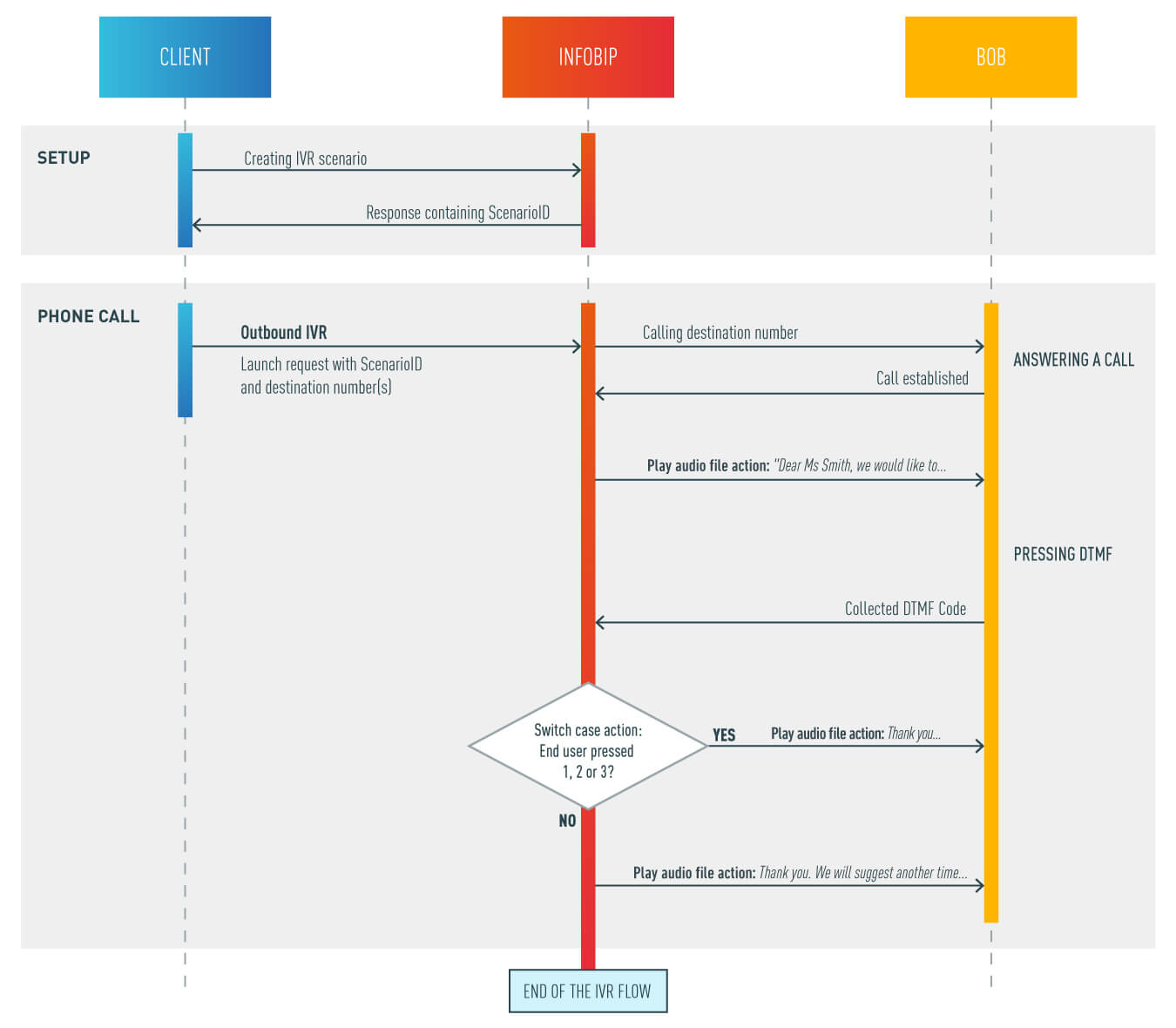
A simple use case to call a customer to schedule an appointment via IVR. The IVR workflow can offer the customer a range of appointment options. Here’s how this process would work.
The client sets up a Scenario and uses the received ScenarioId to Launch Outbound IVR API. Our platform will initiate a call to each destination phone number specified. Once the call is answered, the IVR flow will start playing an audio message inviting the customer to pick one of the available appointment times using DTMF keys.
Here’s how the steps look. Code samples and a flow diagram are below:
- Call customer phone number.
- Once the customer picks up the phone, the IVR message is played: *Dear client, we would like to schedule an appointment for you on October 14th. Available times are 10:00 am, 11 am, and 2:00 pm. Please press 1 for 10 am, 2 for 11 am, or 3 for a 2 pm appointment. If none of these work for you, we will send a new message suggesting different time slots. *
- Collect action gathers the DTMF code entered by end user.
- User input is analyzed and, based on the DTMF, one of the following responses is played:: 4a For DTMF 1, 2 or 3: Thank you. Your appointment is scheduled. 4b For any other DTMF or no DTMF: *Thank you We will suggest another time slot once it’s available. *
Example
{
  "name": "scenario",
  "script": [
    {
      "say": "Dear client, we would like to schedule an appointment on 14.10. Available time is 10:00 am, 11 am and 2:00 pm. Please press 1 for 10 am, 2 for 11 or 3 for a 2 pm meeting. If non of the above suits you, we will send new message suggesting different time frame."
    },
    {
      "collectInto": "scheduleTime"
    },
    {
      "switch": "scheduleTime",
      "case": {
        "1": [
          {
            "say": "Thank you. Your appointment is scheduled for 10 am."
          }
        ],
        "2":[
          {
            "say": "Thank you. Your appointment is scheduled for 11 am."
          }
        ],
        "3":[
          {
            "say": "Thank you. Your appointment is scheduled for 2 pm."
          }
        ],
        "__default": [
          {
            "say": "Thank you  We will suggest another time slot once it’s available."
          },
          "hangup"
        ]
      }
    },
    { "say": "Thank you. Your appointment is scheduled." },
    "hangup"
  ]
}
Checking order/delivery status
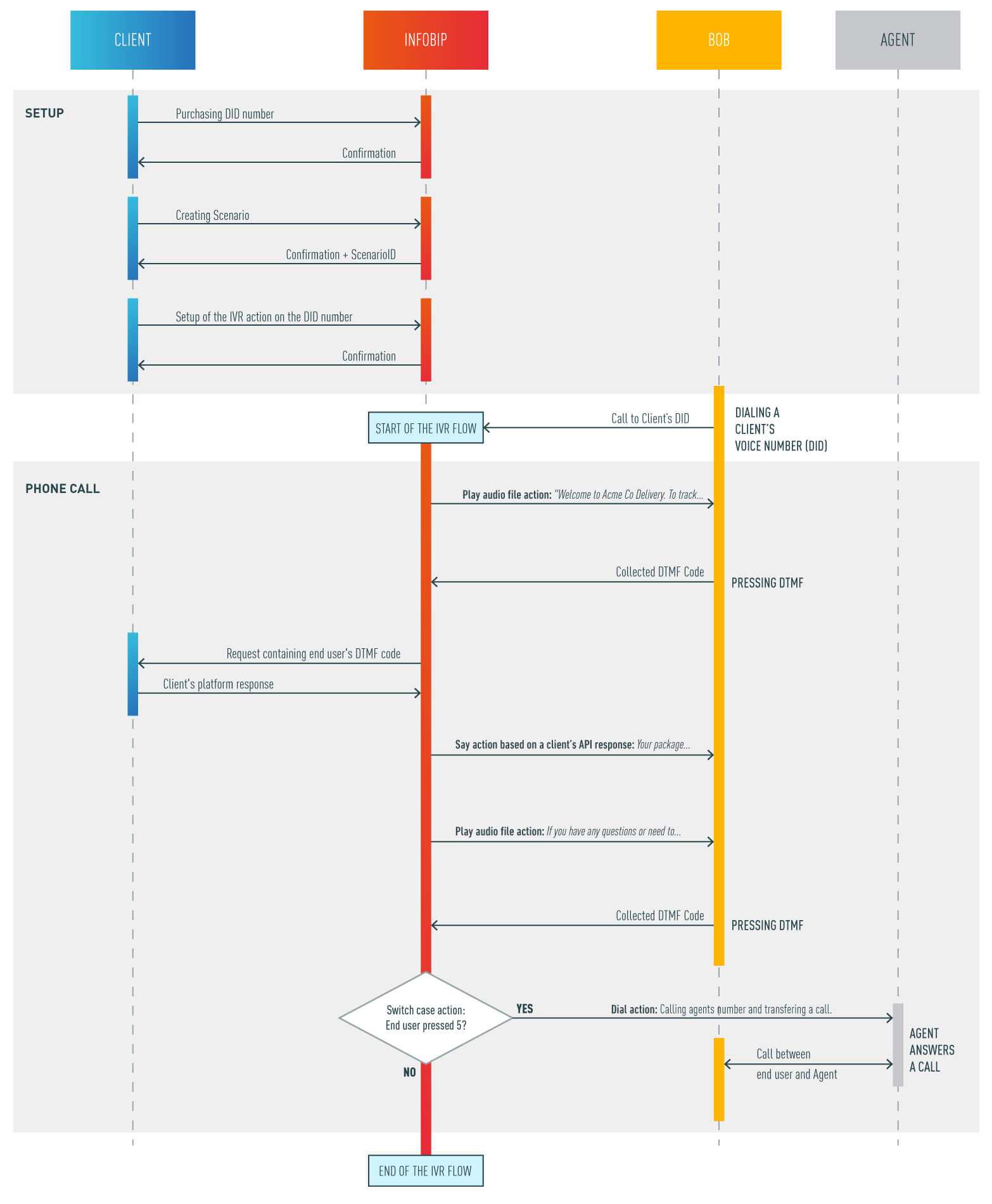
A package delivery company would like to automate customers checking the delivery status of orders and offer customers 24/7 updates on deliveries. The delivery company would obtain a DID (voice number from Infobip) and create an Inbound IVR workflow to respond to customer queries. An IVR workflow can update customers around the clock and on weekends and holidays. A well-designed IVR workflow will reduce the workload on live agents for these simple requests.
In this scenario a customer calls a number and enters a tracking number through DTMF codes which can be checked against the company’s backend systems. The response back is handled by the Text To Speech (TTS) Say action. Here is how the process looks like step by step.
- Customer dials a DID number
- IVR answers the call and plays a message: Welcome to Acme Co Delivery. To track your package, please enter your 5 digit tracking number.
- Using Collect actions IVR gathers a DTMF code entered by the customer.
- In order the check the status of the order, IVR flow calls client’s systems using Call API action and the 5 digit code that was entered by the customer.
- IVR performs Say action based on the backend system’s response from step 4. e.g.: Your package is at your local post office and is scheduled to be delivered tomorrow.
- To provide a possibility to talk to a real agent, additional action offering to transfer the call is added. IVR plays an audio: If you have any questions or need to reschedule the delivery, press 1 to speak with an agent.
- The response is gathered once more using the Collect action
- If the customer didn’t press 1, the call is ended. If the customer entered 1, the IVR workflow dials the predefined client’s number and the call will last until ended by an agent or customer.
{
  "name": "scenario",
  "script": [
    {
      "say": "Welcome to Acme Co Delivery. To track your package, please enter your 5 digit your tracking number."
    },
    {
      "collectInto": "code",
      "options": {
        "maxInputLength": 5
      }
    },
    {
      "request": "https://requestb.in/12345",
      "options": {
        "method": "POST",
        "headers": {
          "content-type": "application/json"
        },
        "body": {
          "code": "${code}"
        },
        "collectResponse":true
      }
    },
    {
      "say": "responseMessage"
    },
    {"say": "If you have any questions or need to reschedule the delivery, press 1 to speak with an agent."},
    {
      "collectInto": "satisfiedAnswer"
    },
    {
      "switch": "satisfiedAnswer",
      "case": {
        "1": [
          {
            "dial": "41793026731"
          }
        ]
      }
    },
    "hangup"
  ]
}
Cart abandonment
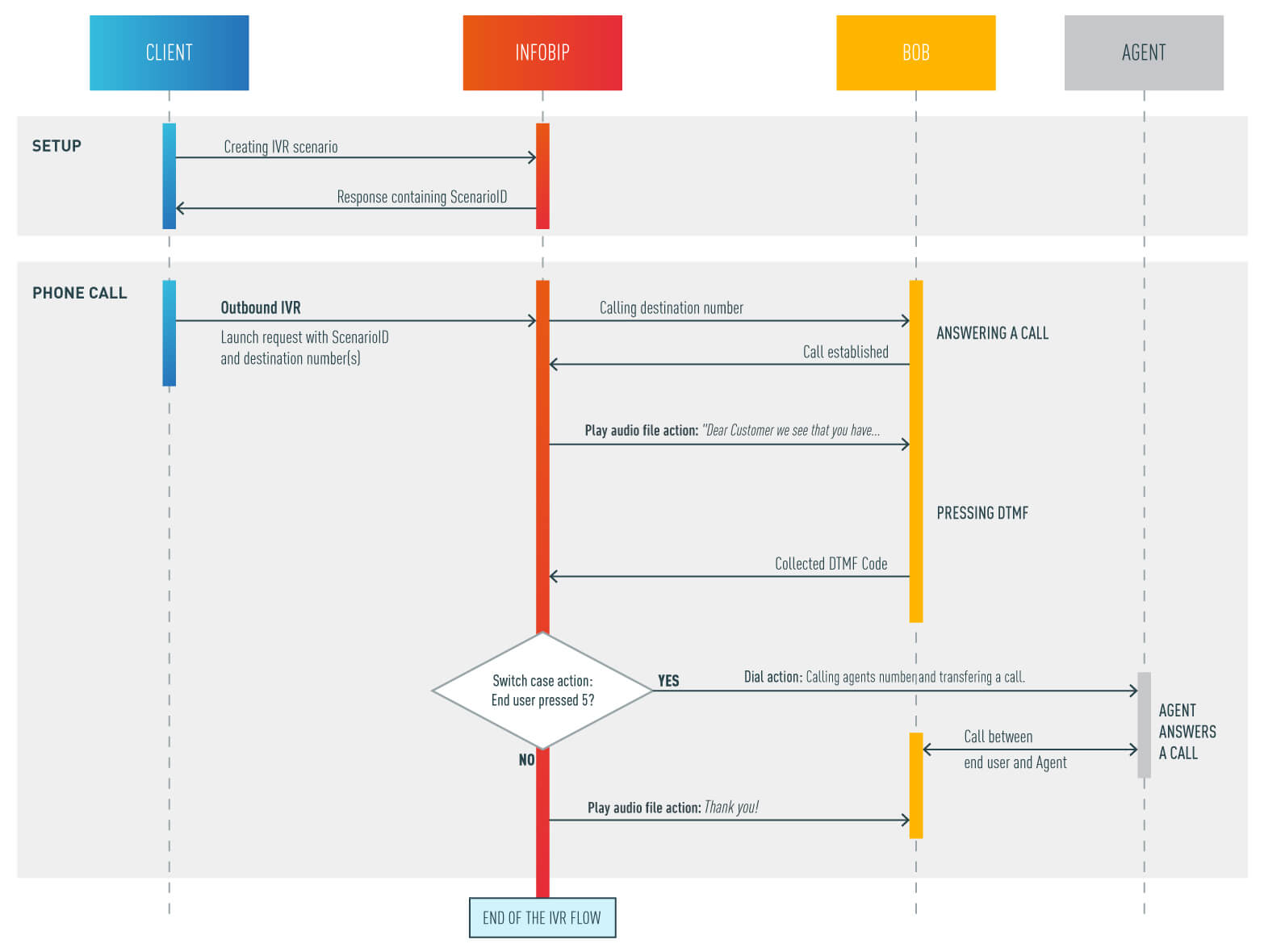
Client has an online store and everyday notices customers clicking and checking out products, even adding them to their shopping carts. But one thing is missing and it is the most important one - checkout and conclusion of the buying process. In order to remind customers and ask them why they did not finish the process, client could send an IVR survey that should give some context on what is going on when users interact with your page. Maybe there is something that needs to be changed in the online buying process or at least to know that some customers are not serious buyers.
Let us break down this process in steps.
- Customer logs in to the web shop and stores a couple of products inside his shopping cart.
- After some time he leaves the web shop without completing the buying process.
- This is noticed by the client’s back end system and this will trigger an IVR scenario ID towards that customer/destination.
- Based on the scenario the customer can be asked the following question:
Dear customer we see that you have some goods in your cart. Would you like us to notify you
once the product in your basket becomes discounted? Press 1 for yes, press 2 for no, press 5 to talk with an agent and get more information. - Customer response will be collected and call API action will enable client to receive it.
- Based on the response codes (DTMFs) the customer pressed, client will do according actions on his side like updating the CRM, calling the customer with more info etc.
{
  "name": "scenario",
  "script": [
    {
      "say": "Dear customer we see that you have some goods in your cart. Would you like us to notify you once the product in your basket becomes discounted? Press 1 for yes, press 2 for no, press 5 to talk with an agent and get more information."
    },
    {
      "collectInto": "DTMFCode"
    },
    {
      "switch": "DTMFCode",
      "case": {
        "5": [
          {
            "dial": "41793026731"
          }
        ]
      }
    },
    {
      "say": "Thank you."
    },
    "hangup"
  ]
}
Languanges
Supported languages can be found here.